

Hello!
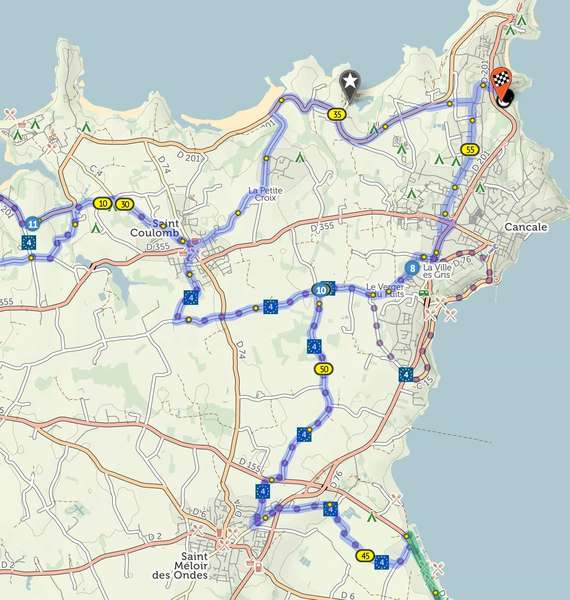
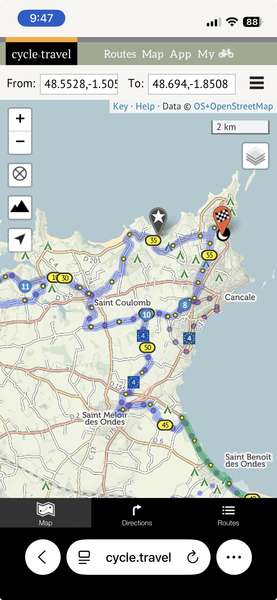
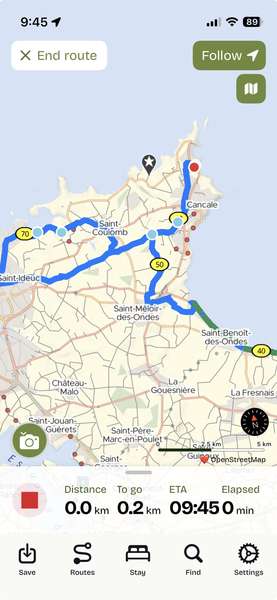
I have been working with a route in Brittany near Cancale. It seems the app always shows a different route than the one I create on the website. I have tried "saving as", duplicating the route, etc, and I alway see a different route on the app. Here are my examples. 1 web version on Chrome/mac. 2. Web version on Safari /iPhone. 3. App version. NOTE: The starred marker is where the part of the route that is missing on the app, but present on the website version.
1. 
2. 
3. 
Thanks for any help... Lorraine


Comments
Could you give a link to the route?
Yes... do I need to make it public or...
https://cycle.travel/map/journey/925541
Lorraine, that route seems to be private.
On the 'My Journeys' page toggle the 'sunglasses' off.
Done! Thanks!
Lorraine, I'm no expert but that route (with 2 overnights) looks unnecessarily complicated with lots of 'doubling back'. Splitting it into 2 individual routes would be more straightforward, especially when it comes to navigating it.
Interestingly, on the website, if we show the elevation the planner reacts like the app - cutting out the loop you refer to.
An effective workaround is to create 2 separate routes
I’m not 100% sure what’s happened here, but I think it might be due to a change in the underlying map data since first plotting the route. To show the turn-by-turn directions (which the app needs), it has to ask the routing engine for the route once again, and if the ‘best’ route between via points has changed this can very occasionally result in an accidental rerouting.
Happily it’s easy to fix – on the website, just click to add a via point on the route north-west of Cancale, basically pinning the route to this road. Then re-save and the app will load it happily.
OK. I'll try that, Richard. Yes, HobbesOnTour you are right.... but there is actually an overnight marked on the tour, and the second part is a day loop back to the same overnight place. I will break up into individual days once I'm closer to the trip in May... that way I can keep tweaking my longer routes (5 longer routes on this trip) and break them up into days later when all the camping, overnights etc are sorted. I'll have 40 nights on the trip so don't want to break it up into 40 separate routes yet!!! Thanks, I love the ability to plan long routes then break them apart before travelling.
That totally worked Richard. Thank you again. Good to go!