

Hello,
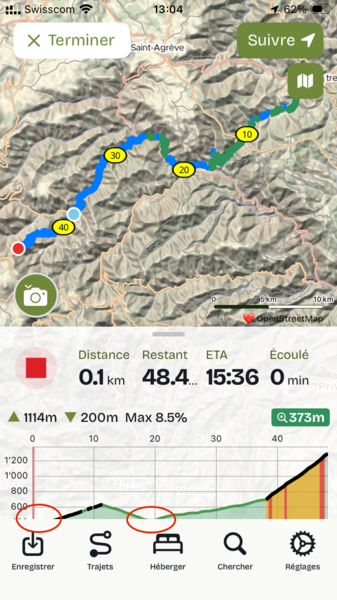
the lowest elevation of the profile of the journey is always cut, as if the vertical scale is not properly calculated. Example on the screenshot. I tried to reboot the iPhone and use the latest version of the app and iOS, but no change. It does not do that on the iPhone of my wife.
Best
Romuald


Comments
It's a pity that you didn't share the route so that I could check it on mine.
However, a quick fix is to open the route on the website on your phone and display the elevation there. Personally, I prefer that view.
Which model of iPhone is it?
Hi, it does that on all the route. I use an iPhone SE 2nd generation and my wife an iPhone 11, where the same route profile appears correctly.
I have the feeling that this is new, I did not notice that in the past.
Ah, that does sound like an iPhone SE-specific issue. The SE is unusual in that it has a small screen and a home button, so getting the layout to work on it is slightly complex. I’ll take a look – thanks for spotting!
I have been using cycle.travel with my iPhone SE for quite a while, but I did not notice that before. I am not certain, but my feeling is that this is new.