
Hiya,
If I open the following route on the Android app:
https://cycle.travel/map/journey/890269
The line rendering goes all screwy, like so:
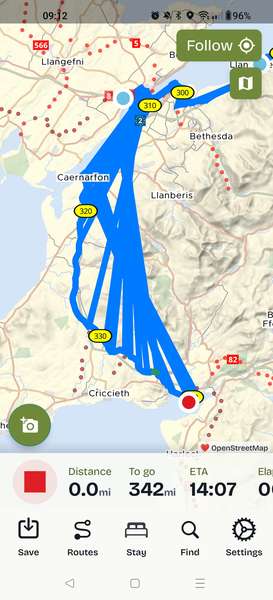
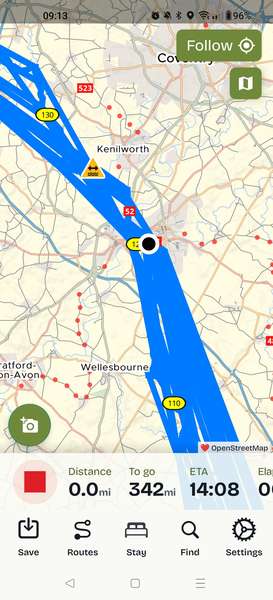
I've only seen it happen with this route I'm particular!

Become a supporter
cycle.travel now has Ordnance Survey maps
Plan multi-day adventures easily
Thanks to Swaledale Outdoor Club!
We’re now in Australia and New Zealand too
Stick to tarmac with our new routing option
cycle.travel expands to Scandinavia and Eastern Europe
Smart Turns – new on cycle.travel's route-planner
Hiya,
If I open the following route on the Android app:
https://cycle.travel/map/journey/890269
The line rendering goes all screwy, like so:
I've only seen it happen with this route I'm particular!


Made in the Cotswolds. Published by Éditions Système D Ltd.
Log in with your cycle.travel account:
| Password |
Or simply use your account on:
Comments
Dan, I can open that route with no issue.
I'd suggest checking if it's the same on the website.
Saving under a different name.
Closing the app and restarting the phone.
And variations of the above
Hobbes, the route you have open there isn't the same as my route (mine ends in Portmeirion, yours ends in Anglesey).
The website displays the route fine, it's just a problem on the app.
The problem persists across app restarts
Saving the route as a new name *did* make the problem go away, interestingly: https://cycle.travel/map/journey/955835
Dan, it's the route you included in your post.
Glad the issue is solved.
It isn't. Open the URL in a web browser and you'll see it ends in Portmeirion.
I'd say the issue has been worked around rather than fixed, the original route is still rendering incorrectly!
Dan, it is the route you included in your post.
What is interesting, though, is that having opened the route on the website, saved it, then opened it in the app, the end points are different as you have pointed out.
That is certainly odd behaviour.
I wonder if you planned it on the website or the app? Is it an imported route?
That’s odd! There’s something screwy around mile 150 (Birmingham area) on the website too. I wonder if there’s some weirdness with the map data there. I’m not anywhere near a computer right now so can’t really dig into it but will take a look when I can.
Thanks Richard!
I noticed that if I just move one node a tiny bit the route fixes itself too, so it's not a massive deal. Seems like maybe a one time data corruption whenever this particular version of the route was saved.
Cosmic rays? :p