
Can someone tell me what the routes that are identified with red dots mean? Are those routes downloadable?

Become a supporter
cycle.travel now has Ordnance Survey maps
Plan multi-day adventures easily
Thanks to Swaledale Outdoor Club!
We’re now in Australia and New Zealand too
Stick to tarmac with our new routing option
cycle.travel expands to Scandinavia and Eastern Europe
Smart Turns – new on cycle.travel's route-planner
Can someone tell me what the routes that are identified with red dots mean? Are those routes downloadable?


Made in the Cotswolds. Published by Éditions Système D Ltd.
Log in with your cycle.travel account:
| Password |
Or simply use your account on:
Comments
Robert, there is a Help page that may be useful for a new user to read.
There, under 'Mapping' you'll find:
Also of interest are the Route Guides
These can be viewed on a map like this
They are downloadable and the ones featured in the guide have additional commentary.
Alternatively, by choosing to select the 'Routes' option on the map page your route will automatically follow 'official' routes.
Thank you for the links. Sorry, but I'm still not clear though. Take this screenshot of a portion of the EuroVelo-6 route. The GPX download is consistent with the thick blue line. But, the Route #6 labels are often along a completely different route as shown. This particular portion with the #6 labels is not downloadable as far as I can figure. Does a premium membership give me more options?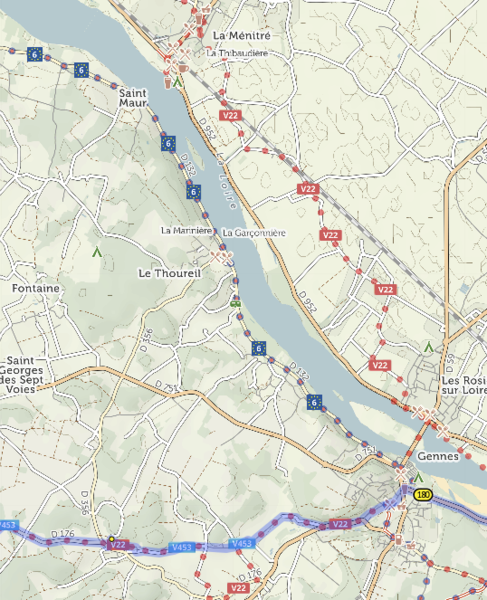
I just noticed in another spot along the route where the GPX file is NOT consistent with the blue line, but in fact follows the red dotted line with the #6 labels. (The screenshot shows this case where the GPX file follows the red dotted line, but not the blue line.)
So, it appears sometimes the GPX route follows the #6 route which is the same as the blue route on the website, and sometimes the GPX route follows the blue line but NOT the red dotted route with the #6 labels.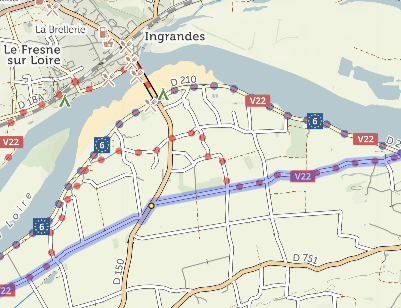
If you could provide a link to the GPX file you’re using, that would help check in this case.
The dots are the route as recorded in OpenStreetMap, which is the mapping data source used by cycle.travel. Sometimes this might differ from the GPX which you’re using.
You can download the GPX for any route you create with the route-planner. If you’d like that route to follow EuroVelo or other signposted cycle routes, switch from ‘Any’ to ‘Routes’ when plotting your route.
OK, I got it. Thank you for your assistance.
Robert